Best IPTV Apps for Firestick in 2026: Top Players Compared
When setting up digital streaming on an Amazon Fire TV device, one of the first questions every user encounters is: which IPTV app or player should I use on my Firestick? With dozens of video player applications available in app stores and developer repositories, choosing the right application can make the difference between a frustrating, laggy interface and a smooth, cable-like viewing experience.
Before diving into comparisons, it is important to clarify a key technical distinction: your Amazon Fire TV Stick serves as the hardware and operating system platform, while an IPTV player is the application software installed on that device. The player itself does not provide television channels or streaming subscriptions. Instead, it acts as an intelligent media interface that connects to your IPTV service provider, indexing live channels, Electronic Program Guides (EPG), catch-up archives, and Video On Demand (VOD) libraries into an organized dashboard.
Because every household has unique preferences, there is no single app that is objectively best for every user. A viewer who wants a simple 2-minute setup might prefer a clean, straightforward interface, while a sports enthusiast or traditional channel surfer may prioritize grid-based EPG guides, custom channel grouping, multi-screen viewing, and advanced playback controls.
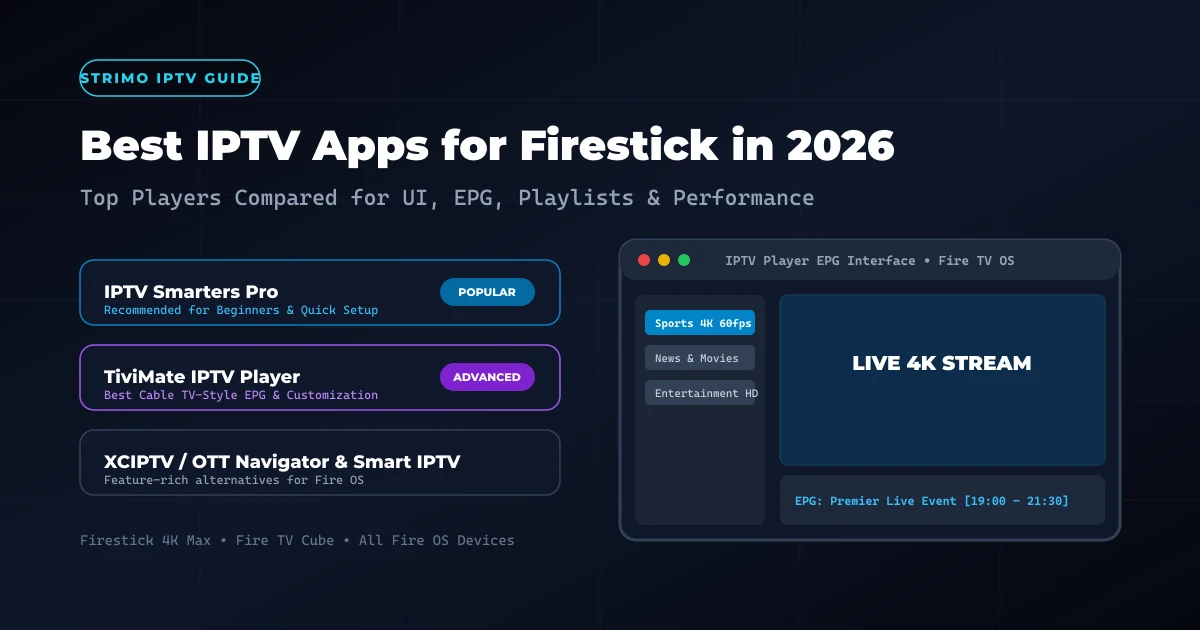
On our official setup documentation and StrimoIPTV installation guide, our technical team highlights IPTV Smarters Pro as our primary recommended application for Firestick devices due to its effortless setup, high compatibility, and intuitive navigation. However, several other compatible players offer distinct features that may suit different streaming styles. In this comprehensive comparison guide, we break down the best IPTV apps for Firestick in 2026, evaluating their interface design, EPG capabilities, remote-control responsiveness, playlist management, and overall streaming performance.
Best IPTV Apps for Firestick in 2026
What Is an IPTV Player on Firestick?
To understand how IPTV playback works on Amazon Fire TV hardware, it helps to visualize the multi-layered architecture of internet television delivery:
Firestick Device (Hardware/OS) → IPTV Player App (Software) → IPTV Credentials (Xtream API / M3U) → Live Channels & VOD Streams
The Firestick running Amazon Fire OS provides hardware video decoders, remote control input, Wi-Fi networking, and operating system memory management. The IPTV player software is responsible for rendering the visual navigation menu, processing channel playlists, formatting program guide data, and managing video buffers.
Crucially, reputable player applications do not host, broadcast, or supply copyrighted media. To watch live television, movies, or sports, users must configure the application with valid account credentials or playlists supplied by their authorized provider.
IPTV players connect to provider servers using several standardized authentication methods:
- Xtream Codes API: The most user-friendly connection method. Users enter a server URL, username, and password. The player automatically fetches and categorizes live channel categories, VOD movie sections, series episodes, and EPG guide data.
- M3U / M3U8 Playlist URLs: A web link containing a structured text list of stream URLs and channel metadata. The player downloads the playlist file to index available streams.
- XMLTV EPG Source: A dedicated web link providing electronic program guide data, channel logos, program descriptions, and schedule timelines.
- MAC Address / Portal System: Legacy authentication where the player's virtual MAC address is registered on the provider's Stalker middleware portal.
What Should You Look for in an IPTV App?
When evaluating a Firestick IPTV player, looking beyond visual screenshots is essential. A great player must combine swift remote-control response times with robust video decoding and clean media organization.
Here is the evaluation framework we use to test and rank IPTV apps for Firestick:
1. Ease of Setup & Authentication
How effortless is it to add your subscription credentials? Players that support Xtream Codes API allow users to log in within seconds using just a username, password, and server URL, eliminating the need to type long M3U web links using an on-screen Firestick keyboard.
2. Interface & Remote-Control Ergonomics
Amazon Firestick users control their TV using a minimalist D-pad remote without a touch screen or full keyboard. The player interface must feature large, easily selectable menu tiles, quick channel switching shortcuts, visible focus highlights, and responsive back-button navigation.
3. Electronic Program Guide (EPG) Integration
A high-quality IPTV EPG Firestick implementation displays an intuitive grid showing current and upcoming television shows, program progress bars, episode descriptions, and channel logos. The app should automatically update EPG data in the background without causing playback stuttering.
4. Favorites & Channel Grouping
Premium IPTV subscriptions often include tens of thousands of international channels. The ability to create custom favorite lists, hide unwanted country categories, reorder channels, and search instantly via remote voice or key entry is vital for quick access.
5. Video On Demand (VOD) Organization
For viewers who enjoy movies and series, the player should organize VOD libraries with movie posters, plot summaries, cast lists, IMDb ratings, genre categories, and automatic episode auto-play.
6. Advanced Playback Controls & Decoders
The player should offer essential playback controls, including hardware video acceleration (HW/HW+), audio track switching (for multi-language broadcasts), subtitle selection (SRT/VTT), aspect ratio adjustment, and video buffer size configuration.
7. Performance & Memory Efficiency
Firestick devices have constrained RAM (typically 1.5 GB to 2 GB). A lightweight player starts up rapidly, loads channel lists smoothly, swappably switches channels without memory leaks, and refrains from crashing during high-bitrate 4K sports broadcasts.
Best IPTV Apps for Firestick in 2026: Top Players Compared
Below is a verified feature breakdown comparing the most prominent IPTV player Firestick applications available in 2026:
| IPTV Player | Best For | EPG Support | Connection Formats | Remote Ergonomics | Advanced Features |
|---|---|---|---|---|---|
| IPTV Smarters Pro | Beginners & General Users | Full XMLTV EPG | Xtream API, M3U | Excellent | Multi-screen, VOD Posters, Catch-up |
| TiviMate IPTV | Traditional TV Experience | Advanced Grid EPG | Xtream API, M3U, Stalker | Superior | Multi-view, Custom Groups, Recording* |
| XCIPTV Player | Media & VOD Enthusiasts | Standard EPG | Xtream API | Very Good | Built-in Speed Test, ExoPlayer, VOD |
| OTT Navigator | Power Users & Customization | Comprehensive EPG | Xtream, M3U, MAC | Good | Studio Mode, PiP, Deep Codecs |
| Smart IPTV (SIPTV) | Minimalist Legacy TV | Basic Guide | MAC Address / Web Portal | Moderate | Simple Channel List, Light Footprint |
Note: Feature availability, EPG indexing speeds, and recording support vary by application version, hardware model, and provider configuration. Always check official application developer documentation.
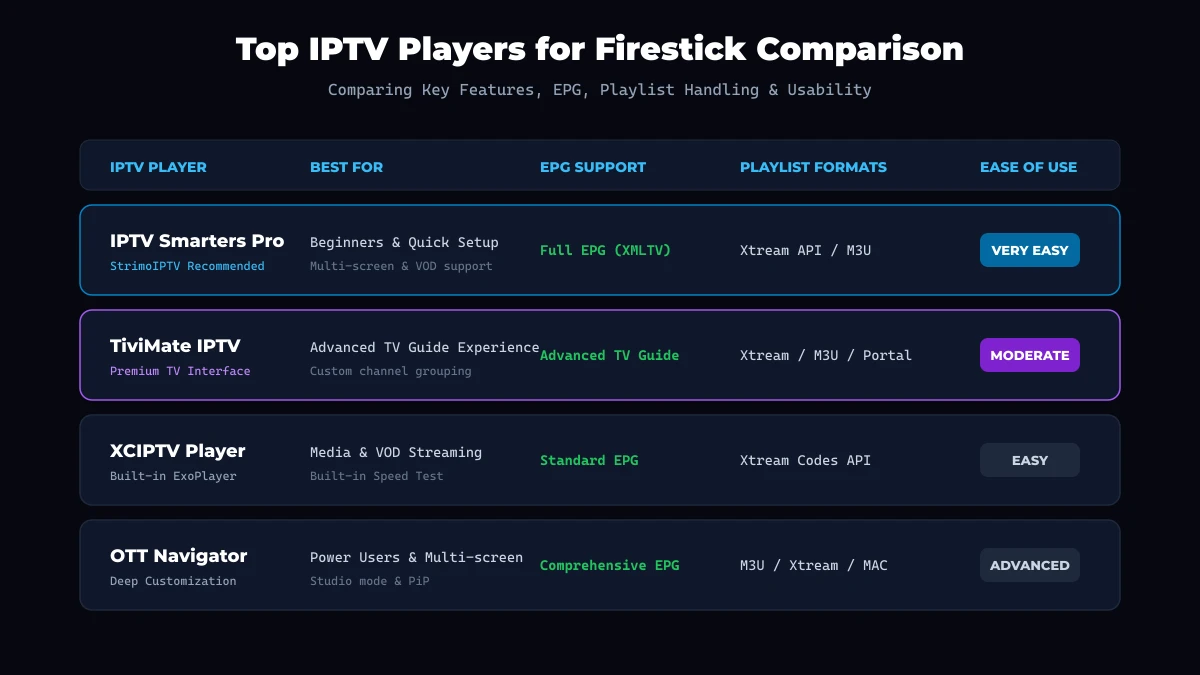 Top IPTV Players for Firestick Comparison
IPTV Smarters Pro on Firestick
IPTV Smarters Pro remains one of the most widely adopted and recognized IPTV apps 2026 across Firestick, Android TV, iOS, and Smart TV platforms.
On our official StrimoIPTV installation guide, IPTV Smarters Pro is highlighted as our recommended starting application because it delivers an exceptional balance of simplicity, aesthetic polish, and multi-format support.
Interface & Layout
The application features a clean dashboard divided into four primary portals: Live TV, VOD Movies, Series, and Catch-Up. This categorized division prevents user confusion, allowing family members of all ages to navigate directly to their desired content.
Key Strengths of IPTV Smarters Pro:
- Effortless Xtream Codes API Login: Users simply select "Login with Xtream Codes API", enter their account name, username, password, and server URL provided upon activating their StrimoIPTV subscription.
- Multi-Screen Support: Enables users to view up to four live channels simultaneously on a single screen—an ideal feature for tracking multiple live sports events.
- Integrated VOD Layout: Displays rich movie posters, cast lists, trailers, synopsis data, and continuous episode playback for television series.
- Parental Controls: Allows parents to lock specific adult or age-restricted channel categories with a PIN code.
- Built-in Player Switching: Offers seamless toggling between internal hardware decoders (Built-in Player) and external media players such as VLC or MX Player.
Limitations:
- Free versions may display occasional operational banners.
- The channel guide utilizes a category-first list layout rather than a classic cable-style full-grid timeline.
Verdict: IPTV Smarters Pro is the ideal choice for beginners and families seeking a polished, reliable application that works seamlessly out of the box.
TiviMate on Firestick
For users who want their Amazon Firestick to replicate the exact feel, speed, and grid navigation of a high-end digital cable or satellite set-top box, TiviMate IPTV Player is widely regarded by power users as the gold standard.
Interface & Channel Navigation
TiviMate is engineered from the ground up exclusively for TV screens and remote controls. Its defining characteristic is its modern, TV guide grid interface. Users can scroll seamlessly through hundreds of channels while previewing live video in a small picture-in-picture window or background overlay.
Key Strengths of TiviMate:
- Cable-Style EPG Grid: Displays a multi-channel timeline guide showing full program schedules, time markers, and detailed show summaries.
- Extensive Channel Grouping & Customization: Users can create custom channel groups, hide empty categories, reorder channels, rename station titles, and assign custom channel logos.
- Multi-Playlist Management: Easily aggregate and switch between multiple provider playlists or EPG sources within a single interface.
- Search & Favorites: Instant remote search across all live channels, movies, and EPG schedules simultaneously.
- Custom Remote Controls: Customize Firestick remote D-pad button actions for quick channel jumping, EPG toggling, and audio selection.
Limitations:
- Premium features (such as multi-view, recording, and advanced channel customization) require upgrading to TiviMate Premium.
- The setup menu contains extensive technical settings that may feel overwhelming to non-technical users.
Verdict: TiviMate is the best option for channel surfers and sports fans who desire a cable-like EPG grid and deep interface customization.
Smart IPTV, XCIPTV, and Other Players
While IPTV Smarters Pro and TiviMate dominate user discussions, several other reputable applications cater to specific user preferences:
XCIPTV Player
XCIPTV Player is an aesthetically pleasing, ExoPlayer-based application featuring a modern tile dashboard. It excels in VOD organization and includes an integrated speed test utility directly inside the settings menu. Its dark-mode UI and large control icons make it exceptionally easy to navigate on Firestick devices using a standard remote.
OTT Navigator IPTV
OTT Navigator is a feature-rich application designed for power users who want granular control over video decoders, network buffering, and stream parameters. It offers advanced features such as "Studio Mode" (viewing multiple streams in custom layouts), automatic picture-in-picture, timeline catch-up filters, and deep codec configuration.
Smart IPTV (SIPTV)
Smart IPTV is a minimalist legacy application that relies on virtual MAC address registration via an external web portal. While it features a low system footprint, its interface is dated compared to modern solutions, and it lacks advanced VOD indexing and multi-screen tools.
Security & Legality Advisory: When installing any application on your Firestick, always download applications from official app stores or trusted developer websites. Never download unofficial modified APK files from suspicious third-party mirrors.
IPTV Smarters Pro vs TiviMate: Head-to-Head Comparison
Choosing between IPTV Smarters Pro Firestick and TiviMate Firestick usually comes down to personal navigation preference. Below is a direct comparison across core categories:
| Category | IPTV Smarters Pro | TiviMate IPTV Player |
|---|---|---|
| Primary Design | Category & Dashboard Driven | Cable TV Guide & Grid Driven |
| Setup Process | Extremely Simple (Xtream API) | Moderate (Requires EPG Configuration) |
| EPG Presentation | Category List + Program Details | Full Multi-Channel Timeline Grid |
| VOD & Series | Exceptional Poster & Metadata UI | Basic / Secondary Focus |
| Remote Control UI | Simple Tile Selection | Advanced Custom D-pad Bindings |
| Multi-Screen | Built-in (Up to 4 Screens) | Available in Premium Version |
| Best User Match | Beginners, Families, Movie Viewers | Channel Surfers, Sports Fans, TV Enthusiasts |
Choose IPTV Smarters Pro if:
- You want to complete setup in under two minutes without adjusting technical settings.
- You frequently watch Video On Demand movies and television series.
- You prefer a straightforward dashboard with clearly separated sections.
- You are following our standard StrimoIPTV installation guide.
Choose TiviMate if:
- You want a traditional television experience with a horizontal timeline EPG.
- You enjoy organizing channels into custom favorites and reordering category lists.
- You want to customize Firestick remote button shortcuts for fast channel switching.
- You are comfortable upgrading to a premium app license for advanced capabilities.
Get Your Strimo IPTV Free Trial
Test our premium anti-freeze 4K IPTV service for 24 hours with zero commitment. Instant setup to watch over 50,000+ live channels, sports, and 200,000+ VODs on any device!
Free vs Paid IPTV Players
When exploring IPTV apps for Firestick, users frequently wonder whether paying for a premium player application is necessary.
It is critical to clarify that purchasing a premium application license unlocks advanced software features within the player app itself—it does NOT supply television channels or IPTV subscription access. The player software and your streaming service remain completely separate.
Here is what distinguishes free player tiers from paid upgrades:
Free IPTV Player Tiers: Typically include core video playback, standard channel indexing, single-playlist support, basic EPG loading, and standard aspect ratio controls. Free versions may include promotional banners or limit advanced channel organization.
Paid / Premium Player Licenses: Unlock advanced capabilities such as multi-channel grid viewing, unlimited playlist integration, automated background EPG sync intervals, custom channel sorting, cloud recording (where supported), and password-protected profile management.
For most casual viewers, free player versions provide all necessary functionality for daily live TV viewing. Power users who stream daily often find that a small one-time or annual player unlock fee enhances their long-term viewing comfort.
How to Choose the Right IPTV App for Your Firestick
To select the best application for your specific needs, match your streaming habits to the decision framework below:
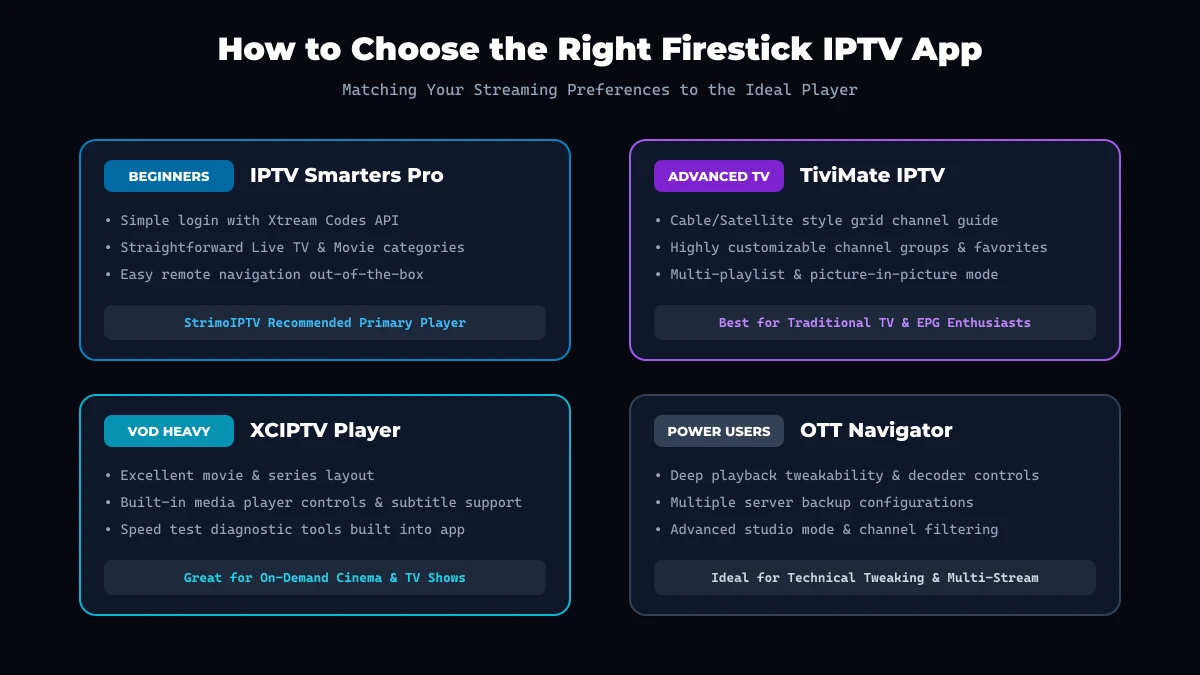 Firestick Player Decision Guide
For Beginners & First-Time Users
Choose IPTV Smarters Pro. Its user-friendly interface and simple login format eliminate technical friction, making it simple to get started without configuring technical parameters.
For Sports Viewers & Live TV Enthusiasts
Choose TiviMate or IPTV Smarters Pro with Multi-Screen. Live sports fans benefit greatly from quick channel switching, EPG time markers, and the ability to watch multiple live matches simultaneously.
For Large Channel Libraries (50,000+ Channels)
Choose a player with powerful search and filtering tools, such as TiviMate or OTT Navigator. When subscribing to expansive channel packages like StrimoIPTV channel list, the ability to hide unused international regions and search instantly saves time.
For Movie & On-Demand Series Enthusiasts
Choose IPTV Smarters Pro or XCIPTV. Both applications offer rich visual media libraries with cover art, plot synopses, episode auto-play, and multi-language audio/subtitle selectors.
How to Install an IPTV Player on Firestick
Installing a media player on your Amazon Fire TV Stick is a quick process. Because full step-by-step screenshots are detailed in our main StrimoIPTV Firestick setup tutorial, here is a concise high-level overview:
- Power on your Firestick and navigate to the Find / Search icon on the home screen.
- Type the name of your chosen app (such as IPTV Smarters or Downloader) using the on-screen keyboard or Alexa voice remote.
- Select the official application from the Amazon Appstore results.
- Click Get or Download to install the application onto your device.
- Launch the application once installation completes.
- Enter your subscription credentials (Xtream Codes API Server URL, Username, and Password) provided by your provider.
- Allow the initial sync to complete to index live channels, movies, and EPG guide data.
For specialized app sideloading or complete device setup instructions across Smart TVs, Android boxes, and Apple TV, visit our complete StrimoIPTV installation guide.
How to Add Your IPTV Service to a Firestick Player
Once your player application is open, connecting your streaming subscription involves entering your provider credentials.
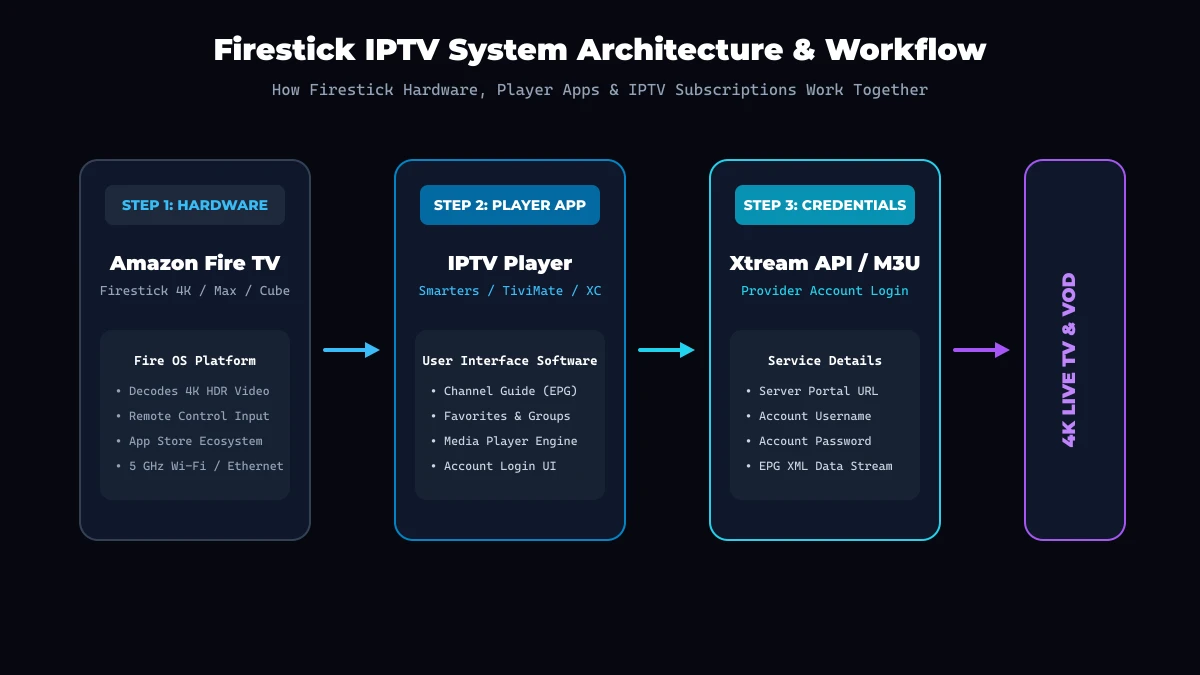 Firestick IPTV Workflow Diagram
Depending on the application, you will encounter two primary login formats:
Method 1: Xtream Codes API (Recommended)
This is the fastest and most secure method. When you activate your account on StrimoIPTV pricing plans, your welcome email contains three key details:
- Any Name: Enter any label (e.g., StrimoIPTV).
- Username: Your unique account username.
- Password: Your secure account password.
- Server URL / Host: The exact portal URL (e.g., http://domain.com:port).
Simply type these credentials into the player's Xtream API login screen and click Add User. The application will automatically construct your channel lists and EPG schedules.
Method 2: M3U Playlist URL
If your player only supports playlist links, select M3U Playlist, enter a name, and paste the complete M3U web URL provided by your service. The player will download the playlist file to load channels.
Best IPTV App Settings for Firestick
To optimize video playback and prevent technical issues, configure these recommended settings inside your chosen application:
- Video Decoder: Set your stream playback engine to Hardware (HW) or ExoPlayer. Hardware acceleration utilizes the Firestick's dedicated GPU, reducing CPU heat and preventing frame drops.
- EPG Time Shift / Offset: If program guide schedules appear an hour ahead or behind your local time, adjust the EPG Time Offset setting (e.g., +1 hr or -1 hr) inside the app guide options.
- Stream Format: Select HLS (.m3u8) or MPEG-TS based on provider recommendations. HLS format provides superior adaptive buffer handling on wireless networks.
- Buffer Size: Set your stream buffer pre-load setting to Medium (2 to 5 seconds). This creates a buffer cushion that absorbs temporary Wi-Fi speed drops without pausing playback.
- Auto-Update on Launch: Enable automatic updating of channels and EPG data upon opening the app to ensure you always view current schedules.
How to Improve IPTV Performance on Firestick
An IPTV player application relies entirely on the underlying hardware and network performance of your Firestick. If you experience navigation lag or stream buffering, apply these performance enhancements:
- Connect to 5 GHz Wi-Fi: Move your Firestick connection from the congested 2.4 GHz band to the faster, less-crowded 5 GHz Wi-Fi band.
- Use an Ethernet Adapter: Connecting your Firestick directly to your router via a USB Ethernet adapter eliminates wireless signal interference and ping spikes. Learn more in our guide to internet speed requirements for IPTV.
- Free Up Storage Space: Amazon Firesticks require at least 1.5 GB of free internal storage to operate efficiently. Uninstall unused apps under Settings > Applications > Manage Installed Applications.
- Clear Application Cache: Periodically clear temporary data by navigating to Settings > Applications > Manage Installed Applications > [Your App] > Clear Cache.
- Close Background Applications: Use a background task utility to terminate idle apps that consume system memory.
- Restart Your Firestick: Perform a system reboot once a week (Settings > My Fire TV > Restart) to clear system RAM.
Common IPTV App Problems on Firestick & Fixes
When troubleshooting playback issues, reference these solutions for common Firestick player errors:
1. Application Crashes or Fails to Open
- Cause: Depleted device memory or corrupted temporary cache.
- Fix: Force stop the app in Firestick settings, clear the app cache, and restart your Firestick device.
2. Channels Fail to Load (Error 403 / Host Error)
- Cause: Incorrect account credentials, expired subscription, or typo in the server URL.
- Fix: Re-check your username, password, and server URL for typos or missing characters. Verify account status with StrimoIPTV customer support.
3. EPG / Program Guide Is Empty
- Cause: EPG source failed to synchronize during initial login or server time mismatch.
- Fix: Navigate to your app's EPG settings and select Update EPG / Refresh Guide Data. Ensure your Firestick system time and time zone are correctly configured.
4. Video Keeps Freezing or Buffering
- Cause: Wi-Fi signal drops, ISP throttling, or incorrect hardware video decoders.
- Fix: Switch player decoder settings from Software to Hardware (HW), connect via 5 GHz Wi-Fi or Ethernet, and test your real-world throughput.
Can an IPTV App Fix Buffering?
A common misconception among streaming users is that switching to a different IPTV application will magically eliminate video buffering.
The short answer is: not always.
Video playback relies on four interconnected links:
- Your Internet Connection & Wi-Fi Quality
- Your Firestick Hardware & Processor Memory
- Your IPTV Player App & Video Decoders
- Your IPTV Service Provider Server Capacity
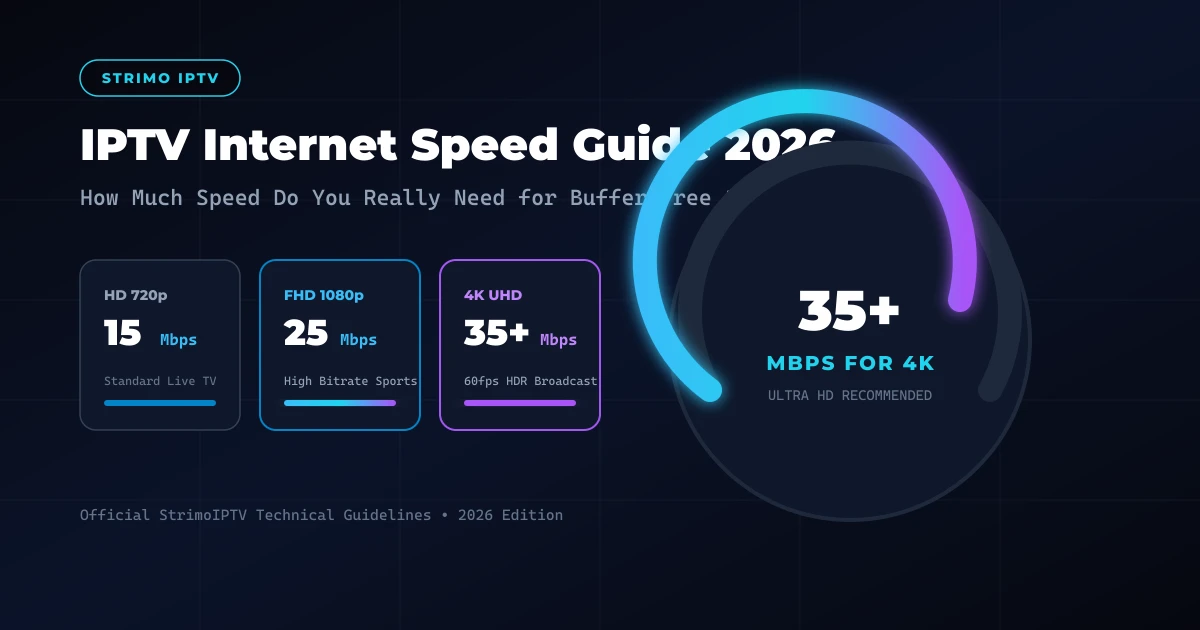
A well-coded IPTV application like IPTV Smarters Pro or TiviMate can optimize video buffer management, utilize hardware decoding efficiently, and render menus smoothly. However, if your home Wi-Fi signal is weak, your ISP is actively throttling stream traffic, or your internet speed drops below 25 Mbps, changing player apps will not resolve underlying network bottlenecks.
To learn how server infrastructure and optimized data routing deliver stable streams, read about how StrimoIPTV streaming technology works.
Best IPTV App for Firestick: Quick Recommendations
Here is a summary matrix matching user preferences to the ideal player application:
| Streaming Preference | Primary Recommendation | Key Advantage |
|---|---|---|
| Beginner / Easy Setup | IPTV Smarters Pro | 2-minute login, intuitive dashboard, high stability |
| Traditional TV / Cable EPG | TiviMate IPTV Player | Superior grid guide, custom groups, remote shortcuts |
| VOD & Cinema Focus | XCIPTV Player | Clean movie poster layout, built-in speed test |
| Technical Customization | OTT Navigator | Deep decoder controls, studio mode, multi-view |
| Minimalist Legacy Hardware | Smart IPTV (SIPTV) | Lightweight portal loading for older devices |